

Tumpixel
Tumpixel
Create an Account – Quick & Easy Registration Guide
This guide will walk you through the steps to create a new account and start using the platform.
🧭 Overview
Creating an account allows you to:
Access the builder
Create and manage your websites
Install and use applications (modules)
Manage your data in one place
✍️ Step 1: Open the signup page
Go to the Create your account page from the homepage or login screen.
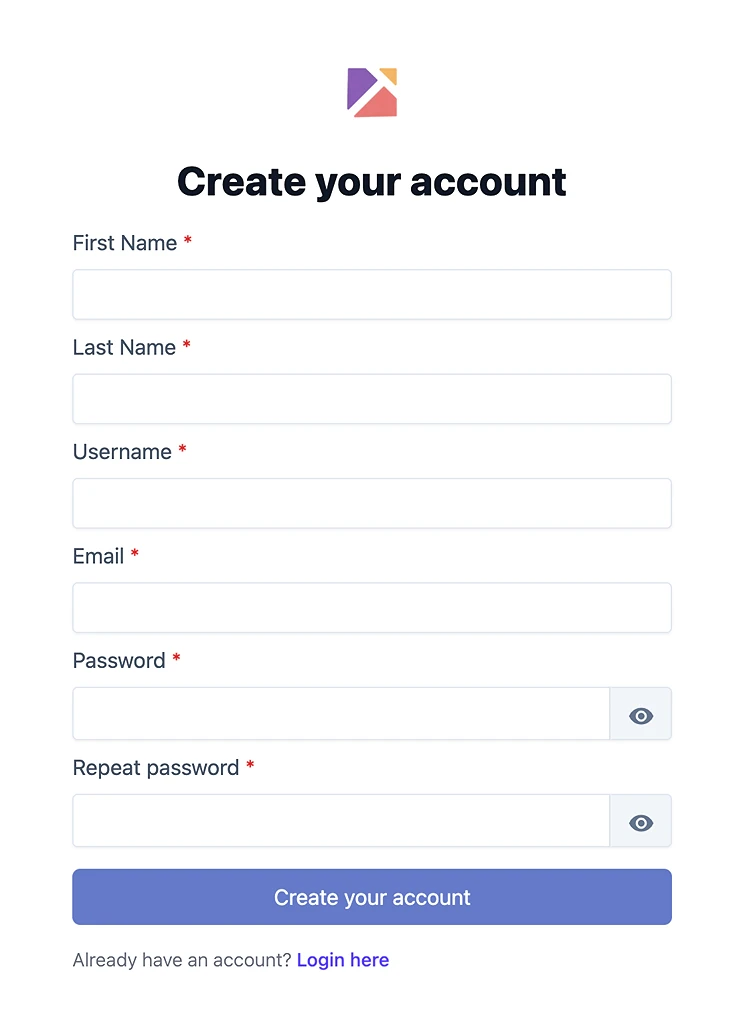
🧾 Step 2: Fill in your information
Complete all required fields:
First Name
Enter your given name.
Minimum: 2 characters
Last Name
Enter your family name.
Minimum: 2 characters
Username
Choose a unique username.
Length: 6–20 characters
Allowed:
Lowercase letters (
a–z)Numbers (
0–9)
Not allowed:
Spaces
Special characters
👉 Your username may be used for URLs or identification in the system.
Enter a valid email address.
Used for login and account-related notifications
Password
Create a secure password.
Minimum: 8 characters
👉 Click the 👁 icon to show or hide your password.
Repeat Password
Re-enter your password to confirm.
Must match the password exactly
✅ Step 3: Submit the form
Click “Create your account” to complete registration.
⚠️ Validation & error messages
If there are issues with your input, you will see error messages below the fields.
Common errors
This field is required
→ You left the field emptyMust be at least X characters
→ Your input is too shortInvalid email address
→ The email format is incorrectUsername is invalid
→ Only lowercase letters and numbers are allowedPasswords do not match
→ Confirmation password is different
📧 Step 4: Verify your email
After signing up, you will receive a verification email in your inbox.
Open your email inbox
Find the email from the platform
Click the verification link inside the email
👉 If the link does not open automatically, you can copy the link and paste it into your browser.
Once completed, your account will be fully activated.
❗ Didn’t receive the email?
Check your Spam / Junk folder
Make sure you entered the correct email address
Wait a few minutes and try again
Request a new verification email if needed
🔐 Step 5: Account ready
Once successful:
Your account is created
You can start using the platform immediately
🔁 Already have an account?
Click “Login here” to sign in instead.
💡 Tips
Use a valid email to avoid issues with login or recovery
Choose a simple username (easy to remember and type)
Create a strong password to keep your account secure
❓ Troubleshooting
I can’t create an account
Check all required fields are filled
Make sure there are no validation errors
Username already exists
Try a different variation (e.g. add numbers)
I didn’t receive any email
Check your spam/junk folder
Ensure your email address is correct
🔒 Security note
Your data is securely handled. Passwords are encrypted and never stored in plain text.