

Tumpixel
Tumpixel
My Orders & My Applications Guide – Manage Purchases Easily
🧭 Overview
There are 2 main tabs:
My Orders → Purchase history
My Applications → Active module licenses
🧾 1. My Orders
📦 What is My Orders?
My Orders shows all your purchase transactions, including:
Modules you added to cart
Selected plans
Payment details
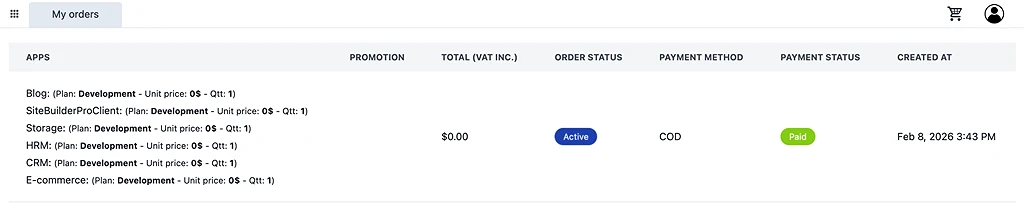
📊 Order information
Each order includes:
Apps → List of purchased modules
Promotion → Discounts (if any)
Total (VAT included) → Total price
Order status → Active / Pending
Payment method → COD / other methods
Payment status → Paid / Unpaid
Created at → Order date
💡 Example
Blog (Development plan)
E-commerce (Development plan)
Storage / CRM / HRM
👉 All purchased in one order → grouped together
🧠 Important note
Orders are transaction records only
They do not control module usage directly
👉 Module usage is managed in My Applications
🧩 2. My Applications
📦 What is My Applications?
My Applications shows your module licenses at account level
👉 This is the most important part of the system
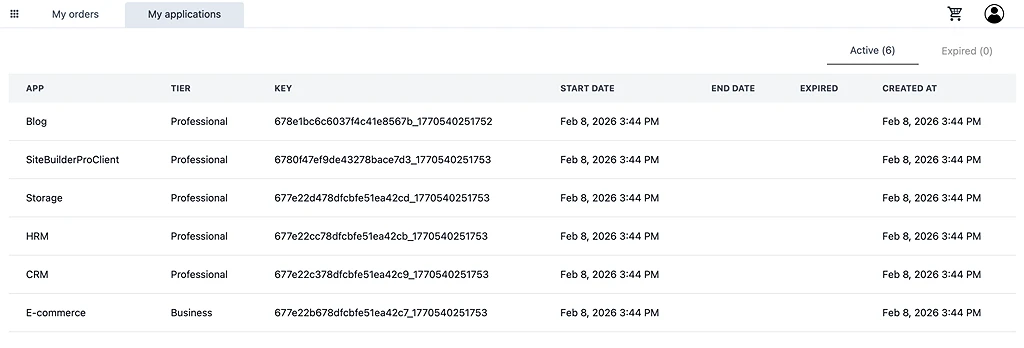
📊 Application information
Each application includes:
App name (Blog, CRM, E-commerce…)
Tier (Free / Starter / Professional…)
Key → Unique license identifier
Start date
End date (if applicable)
Status (Active / Expired)
🔄 Tabs
✅ Active
Shows all currently usable modules
These can be installed into websites
❌ Expired
Shows expired or inactive modules
Cannot be installed until renewed
⚙️ How applications work (important)
Modules in My Applications are:
Linked to your account
Available to install into websites
🔁 Usage flow
Purchase module (My Orders)
        ↓
Become license (My Applications)
        ↓
Available modules list
        ↓
Install into website (via Website Settings)
🌐 Install into website
To use a module:
Go to your website
Open Website Settings
Go to Modules / Applications
Select from available modules (My Applications)
Install into the website
🔄 Reuse across websites
Same module license → multiple websites
No need to purchase again
👉 Limited by:
Number of websites (Site Builder Pro plan)
⚠️ Important notes
Modules are:
Purchased via My Orders
Managed via My Applications
Installed per website
Expired modules:
Remain visible
Cannot be used until renewed
💡 Tips
Check My Applications to see what you can use
Use Free tier modules to test features
Upgrade plans when scaling
Keep track of expiration dates
🎯 Key takeaway
👉 Think of the system like this:
My Orders → Payment history
My Applications → Module licenses
Websites → Where modules are used